Waitlists, Skip the Line, and More: Four Exciting South Shore MyChart Enhancements
Author

South Shore Health
South Shore MyChart, our online patient portal, is filled with helpful tools and features for South Shore Medical Center patients.
MyChart allows patients to schedule appointments, send secure messages to their care team, and more, right from a computer or smartphone.
In an effort to continue to improve patient experience and provide convenient access to care, we recently rolled out some exciting new MyChart features.
Each feature is designed to make things even better for our patients – and we’re thrilled to share them with you!
As a reminder, MyChart is a free service open to all South Shore Medical Center patients. If you don’t have a MyChart account, you can register online.
Online self-scheduling: make an appointment without a phone call
One of MyChart’s most popular features is the online scheduling tool, which allows patients to schedule an appointment without picking up the phone.
In the past, patients were limited to scheduling physicals and office visits – now, we’ve expanded the self-scheduling service to include several new appointment types!
Patients can now use MyChart to self-schedule:
- Same-day sick visits: We recently increased the number of same-day appointments available on a daily basis, particularly in pediatrics. You can also now schedule them online! If you or your child needs same-day care, simply log in to MyChart and choose the next available appointment.
- Lab appointments: If you have an open lab order, whether for pre-physical blood work, diabetic A1C, or other needs, you can schedule your lab draw appointment in MyChart.
- Therapy: Patients with a referral for physical or occupational therapy can schedule their appointments in MyChart.
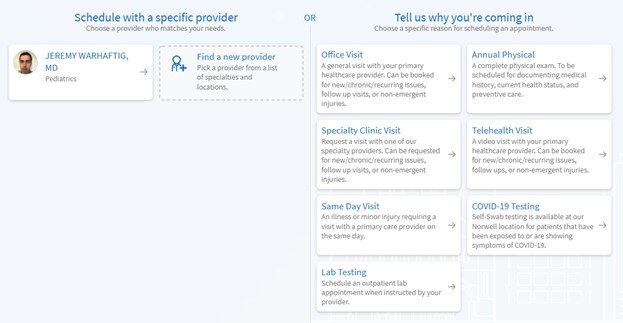
How to use: Log in to MyChart and click the “Menu” icon (three horizontal lines), then click “Schedule an appointment” to view available visit types.
Follow the prompts and questionnaires that apply to your selection.
Pre-Check In – and don’t forget to say “Hello”
When you have an appointment with us, there are a few pre-visit tasks that need to be completed before you see your provider.
These include things like verifying insurance and demographic information, paying co-pays, and answering pre-visit questionnaires.
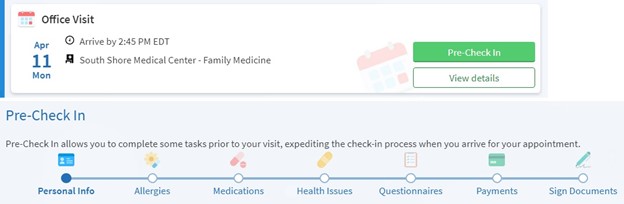
In the past, these things were taken care of at the check-in desk – but with Pre-Check In, you can complete nearly all of your pre-visit requirements in MyChart before you arrive at our practice!
In the days before your appointment, you’ll receive an email or a notification from the MyChart app telling you that Pre-Check In is available.
Simply follow the on-screen prompts, make any necessary edits, and you’re pre-checked in.
However, there’s still one more step: you need to say “Hello!”
Hello Patient is a geo-targeting feature that lets us know you’ve arrived at our practice. When you arrive, you’ll get a notification on your phone that allows you to say “I’m here.”
Please note that in order to receive the notification, you must have MyChart notifications turned on and must enable MyChart location access on your phone.
If you don’t have those turned on, you can still open the MyChart app when you arrive to complete the process without receiving the notification.
Provided you’ve already completed Pre-Check In, you can choose “Yes, I’m Here” and you’ll be all set to proceed directly to the waiting room in Family Medicine, Internal Medicine, or Pediatrics.
If there are any last-minute issues, you’ll be prompted to complete Pre-Check In or visit our front desk.
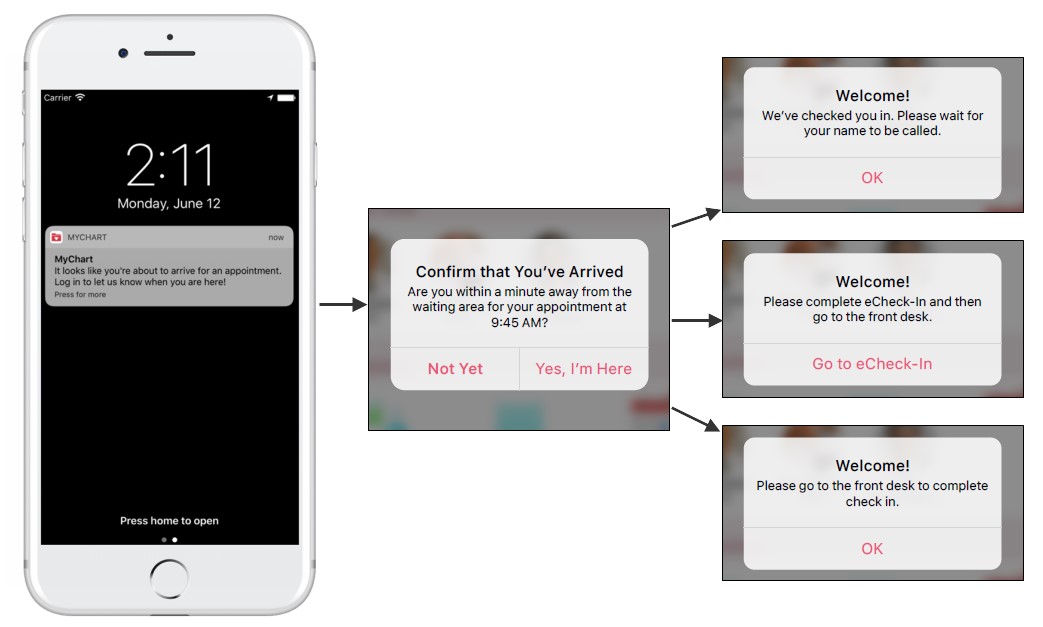
By completing Pre-Check In and using Hello Patient, you’ll be able to walk from your vehicle to the waiting room with no further interaction required – it doesn’t get much more efficient than that!
How to use: Pre-Check In and Hello Patient are available as standard MyChart features – you don’t need to opt in.
To make the most of them, check your email in the days before your appointment or turn notifications and location access on in the MyChart app.
FAST Pass: Move up to an earlier appointment
We make every attempt to get patients in to see their provider as soon as possible – but sometimes there’s a bit of a wait, especially during times of high patient volume.
FAST Pass is our new waitlist service that allows patients to claim an earlier appointment in the event of a cancellation.
After scheduling an appointment in MyChart, patients can opt in to FAST Pass by clicking “Get on the Wait List.”
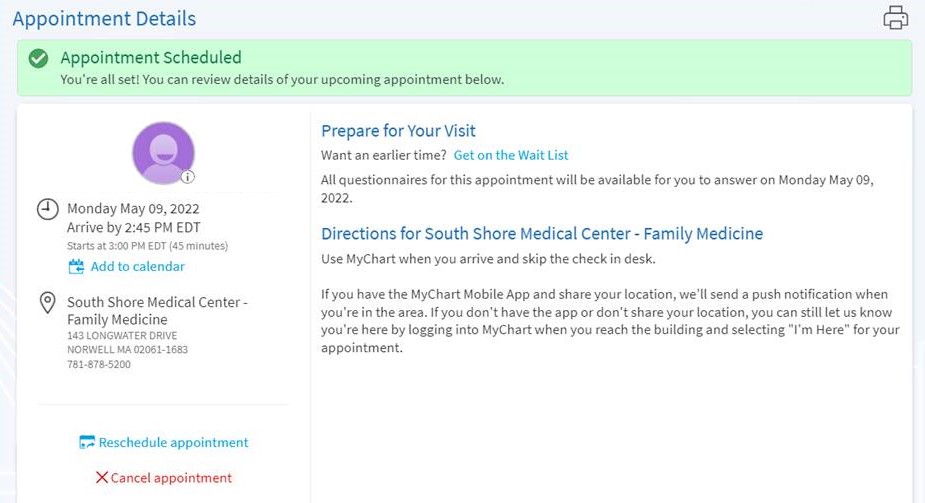
Patients who schedule an appointment via phone can ask the scheduling staff to add them to the waitlist as well.
If an earlier appointment becomes available, patients will receive an email or app notification telling them about the opportunity to switch to the new appointment.
Simply log in, view the details of the new appointment, and choose “Accept new time” or “Keep existing time.”
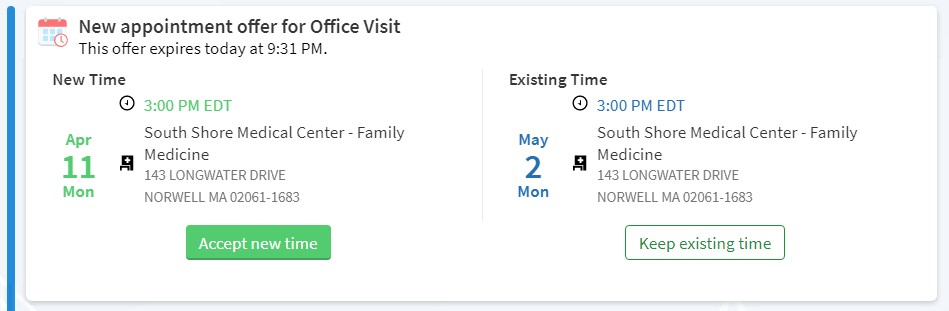
Please note that FAST Pass appointments will be made available to multiple waitlist patients at once, so it’s important to accept any offers quickly.
How to use: Patients can opt in to the waitlist after scheduling an appointment in MyChart.
Ready to use MyChart? Register for an account or sign in to your account.
If you’re having trouble accessing your MyChart account, please contact our Help Line at 781-261-4480.
Author
South Shore Health